


New article
Recently updated
Merging product entries

Who is this article for?
Administrators who want to learn to merge product entries.
Administrator permissions are required.
If duplicate product entries exist in your catalog, you can merge them to maintain data consistency and prevent errors.
1. Merging duplicate entries
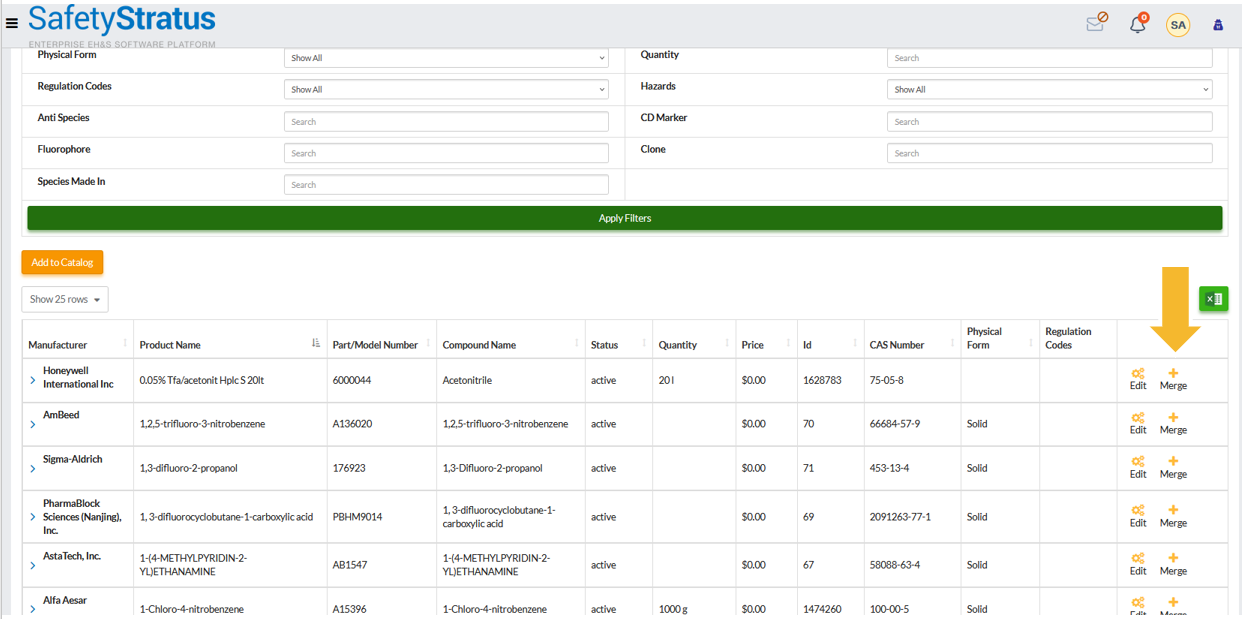
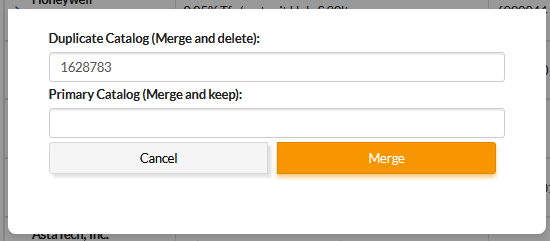
To merge duplicate product entries, follow these steps:
- Locate the duplicate entry in your catalog.
- Click the + Merge icon.
- Enter the Profile ID of the target product that the duplicate should merge into.
- Confirm the merge to consolidate associated data, containers, and audit history.
Tip: Always confirm both products link to the same Chemical Profile before merging to prevent data loss.
2. Understanding key benefits
Merging product entries provides several administrative advantages:
| Benefit | Description |
|---|---|
| Data Consistency | Ensures all users select from vetted catalog entries, reducing data entry errors. |
| Compliance Control | Automatically links hazard and regulatory data to every product record. |
| Risk Mitigation | Restricts access to sensitive materials and sends alerts when thresholds are exceeded. |
| Scalability | Supports specialised attributes for different industries, including biotech and pharmaceuticals. |
3. Following best practices
To maintain an effective product catalog, consider these recommendations:
- Standardise naming conventions – Use the format Chemical Name – Manufacturer – Catalog # (for example, Acetone – Fisher Scientific – A949)
- Keep catalog entries current – Archive discontinued products to prevent new use whilst retaining history
- Validate the Profile link – Always link to the correct Chemical Profile to ensure hazard and SDS data populate accurately
- Use the Restricted flag strategically – Apply it to controlled substances, DEA-listed materials, or regulated carcinogens
- Run quarterly catalog reviews – Check for duplicates, inactive suppliers, or outdated package sizes
- Communicate catalog changes – Notify users when entries are updated, merged, or discontinued to maintain clarity across departments