


New article
Recently updated
Configuring chemical inventory detail forms

Who is this article for?
Administrators who want to learn to configure the chemical inventory detail form.
Administrator permissions are required.
The Chemical Inventory Detail Form in the Chemical Management System (CMS) allows you to define which data points are captured for each container, ensuring records are consistent, complete, and compliant across your organisation.
1. Understanding why form configuration matters
Tailoring the form to your organisation's needs supports everything from internal safety management to regulatory reporting. Different industries benefit from specific configurations:
- Academia: Require fields like storage temperature, pressure, and expiration date to support lab safety standards and inspection readiness
- Manufacturing: Capture lot numbers, purchase orders, and quality assurance data to enable traceability and streamlined audit responses
- Construction: Record storage codes and sub-locations to track hazardous materials and maintain proper hazard segregation on job sites
- Industry and research and development: Log advanced data points such as stabilising solvents or nanoparticle indicators to ensure specialised research materials meet handling and reporting requirements
2. Configuring field visibility and requirements
Each field in the Chemical Inventory Detail Form can be customised to match operational or compliance needs.
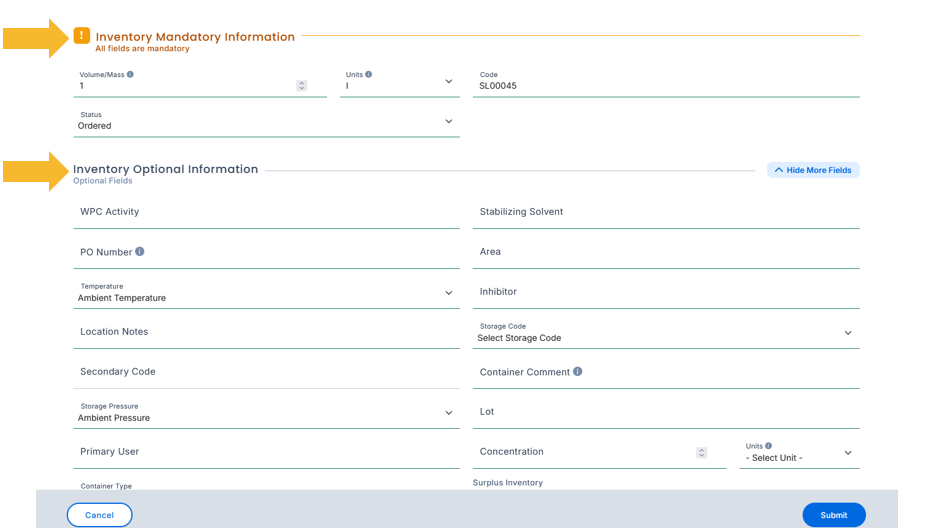
You can configure fields to be:
- Show: Displayed in the container's detail view
- Hide: Removed entirely from the form
- Required: Must be completed before saving a record
- Optional: Visible, but not mandatory
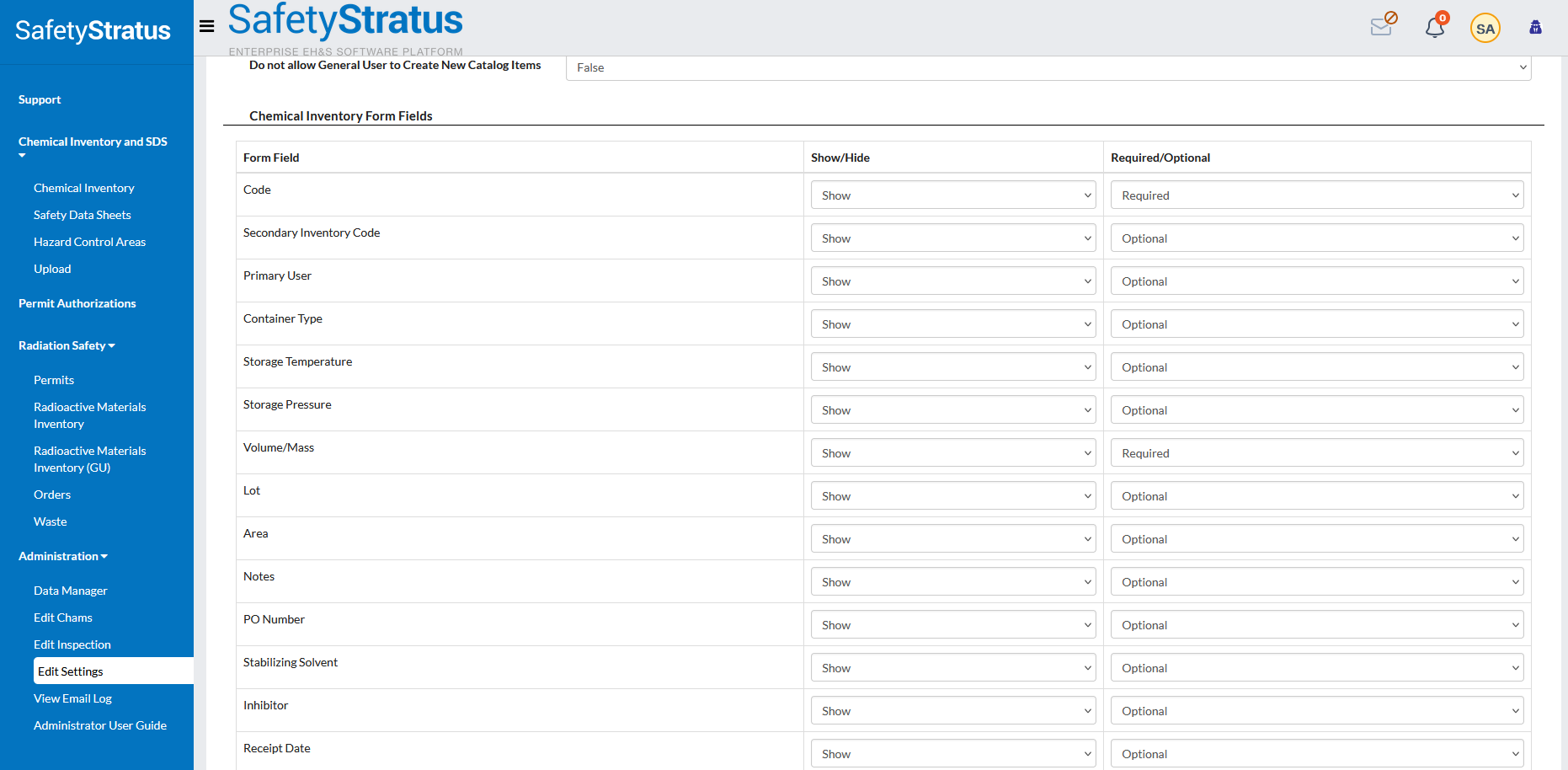
To access the configuration settings, follow these steps:
- Go to Edit Settings, then select Chemical Inventory, then choose Chemical Inventory Form Fields.
3. Understanding commonly used fields
The following fields serve specific purposes across different operational contexts:
| Field | Description | Example / Context |
|---|---|---|
| Code | Unique container identifier printed on barcode labels. | Manufacturing quality assurance tracking |
| Secondary Inventory Code | Additional identifier for cross-system or procurement references. | Linking with external tracking systems |
| Primary User | Main owner's email or assigned individual. | Lab roster tracking in academia |
| Container Type | Material of the container. | Glass, HDPE, metal; used for safety and storage planning |
| Storage Temperature | Defines required temperature range. | Refrigerated vs. ambient storage |
| Storage Pressure | Specifies pressure conditions. | Pressurised or vacuum‑sealed materials |
| Volume or Mass | Records container quantity for reporting. | Supports accurate regulatory submissions |
| Lot Number | Tracks production batches. | Essential for QA and recalls |
| Area | Identifies the sub‑location within a room. | Ensures hazard segregation in construction |
| Purchase Order Number | Purchase order reference number. | Enables budget and procurement tracking |
| Stabilising Solvent | Lists solvent used to stabilise reactive materials. | Ethanol in peroxide‑forming compounds |
| Inhibitor | Identifies inhibitor details. | BHT added to prevent polymerisation |
| Expiration Date | Defines end‑of‑use or review date. | Triggers automated expiration alerts |
| Storage Code | Predefined hazard category code. | Integrates with system storage code matrix |
| Safety Data Sheet | Safety Data Sheet attachment or link. | Ensures up‑to‑date compliance documentation |
| Price | Records container cost. | Useful for departmental budget tracking |
| Nano Particles | Flags presence of nanomaterials. | Enables nanomaterial compliance tracking |
| Testing Required | Indicates if periodic testing or verification is needed. | Peroxide testing for ethers |
4. Applying best practices for form configuration
Follow these recommendations to optimise your Chemical Inventory Detail Form:
- Tailor the form to your programme goals: Academic institutions may prioritise safety and hazard data, while manufacturing may focus on traceability and cost tracking
- Use required fields strategically: Only mark critical compliance fields (such as Chemical Abstracts Service number, storage temperature, and expiration date) as required to avoid user frustration
- Avoid clutter: Hide unused fields to simplify the user interface and speed up data entry
- Leverage barcode identifiers: Ensure each container has a unique code for accurate tracking during audits and reconciliations
- Enable automated alerts: Configure expiration dates and storage limits to trigger notifications for proactive compliance management
- Audit field usage annually: Review which fields are being used and retire or adjust those that no longer serve a compliance or operational purpose