


New article
Recently updated
Creating and managing codes

Who is this article for?
Administrators who want to learn to create and manage codes.
Administrator permissions are required.
Regulation codes help you tag and track chemicals subject to specific regulatory requirements, enabling automated compliance reporting and audit readiness across your organisation.
1. Adding a new regulation code
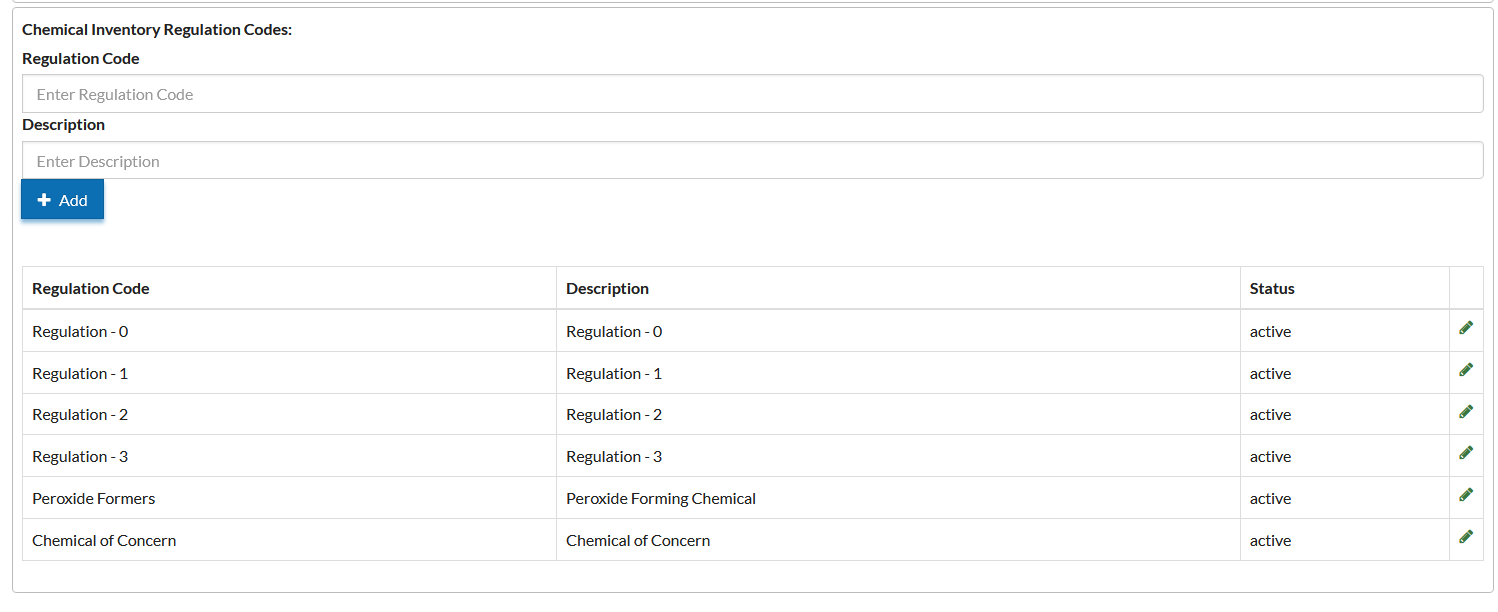
To add a new regulation code, follow these steps:
- Go to Edit Settings.
- Select Chemical Inventory.
- Choose Chemical Inventory Regulation Codes.
- Click Add New Regulation Code.
- Enter a Code (short identifier, such as EPA-TRI or PSM).
- Provide a Description (brief explanation of the regulatory context).
- Click Add to save.
2. Editing or archiving existing codes
To modify an existing regulation code, follow these steps:
- Locate the code to modify and click the Edit icon.
- Update the Code or Description as needed.
- Set Inactive to temporarily hide it from future selections.
- Set Archived to remove it from active use while preserving historical records.
- Click Save to confirm changes.
Tip: Inactivating unused codes helps maintain cleaner dropdown menus while keeping older data intact for audit purposes.
3. Understanding example use cases
Regulation codes support compliance across various industries:
| Industry | Example Application | Purpose |
|---|---|---|
| Academia | Tag chemicals listed on a university's restricted substance list or requiring Research Safety Board review. | Improves oversight for regulated research materials. |
| Manufacturing | Flag compounds subject to OSHA Process Safety Management (PSM) standards. | Supports compliance and operational safety. |
| Construction | Identify volatile organic compounds (VOCs) for environmental air quality compliance. | Simplifies emissions reporting. |
| Industry / EHS | Mark materials requiring EPA Toxic Release Inventory (TRI) reporting. | Automates environmental reporting and tracking. |
4. Recognising key benefits for administrators
Regulation codes provide several advantages for system administrators:
| Benefit | Description |
|---|---|
| Cross-module integration | Regulation codes link directly to Profiles and Products, driving automation in hazard and compliance modules. |
| Reporting accuracy | Enables quick filtering of chemicals tied to specific regulations for annual or ad-hoc reporting. |
| Audit readiness | Keeps a permanent record of regulatory status changes and historical tracking. |
| Institutional alignment | Supports organisation-wide visibility for all regulated materials across multiple facilities. |
5. Following administrator best practices
Apply these tips to maintain effective regulation code management:
- Use short, intuitive codes – Keep identifiers concise (such as EPA-TRI, DHS-CFATS, OSHA-PSM) so users recognise them easily on labels and reports.
- Centralise management at the Profile level – Linking codes to Profiles ensures consistency across all sites and containers.
- Review quarterly – Audit regulation codes to confirm active substances and retire outdated entries as regulations evolve.
- Document definitions – Maintain an internal reference sheet describing each code's regulatory basis to support audits and staff training.
- Coordinate across departments – Work with EHS, compliance officers, and procurement to align regulation codes with internal approval and reporting workflows.